

Read This First
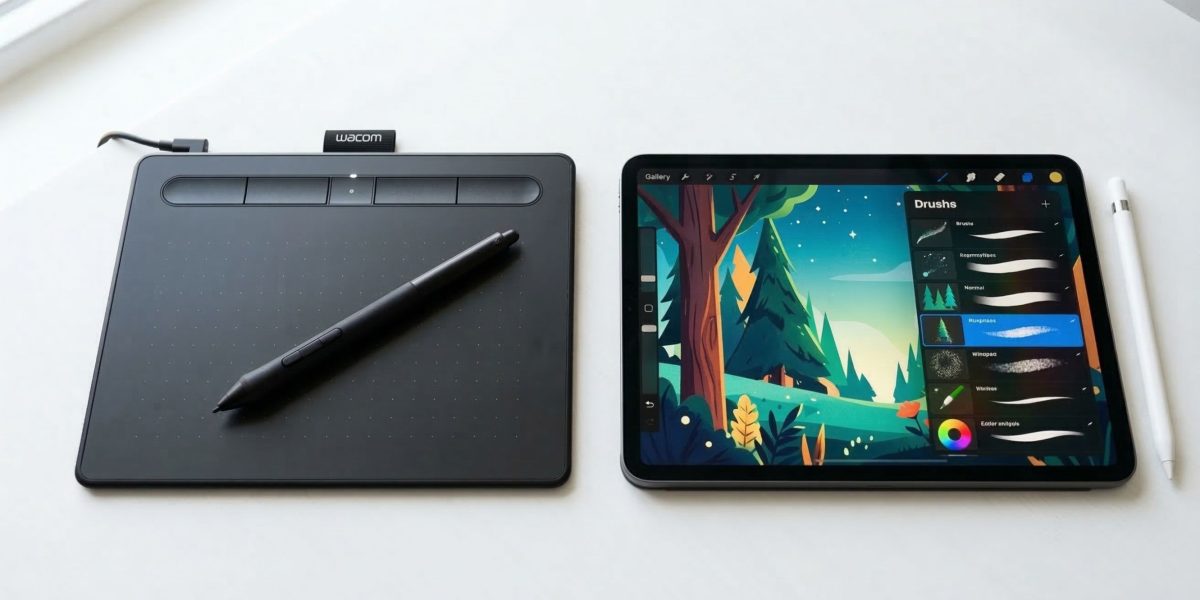
Every beginner asks the same question before buying their first drawing tablet: which one should I get? And every YouTube video gives a different answer. The truth is, for most beginners in India, the difference between tablets in the same price range is smaller than it looks — and the specs that sound impressive on paper rarely matter in your first year of learning.
This guide cuts through the jargon. We'll explain what actually matters, show you what's available at each budget, and help you make a decision you won't regret six months from now.
Learn digital art before you spend anything
Join Artma's free workshop — no software or tablet needed to get started.
Pen Tablet vs. Display Tablet — What's the Difference?
This is the most important thing to understand before buying. There are two completely different types of drawing tablets, and beginners often mix them up.
- ◦ A flat surface you draw on — you look at your monitor
- ◦ No screen on the tablet itself
- ◦ Takes a few days to get used to the hand-eye disconnect
- ◦ Lighter, cheaper, more durable
- ◦ Used by most professional digital artists worldwide
- ◦ Has a built-in screen — you draw directly on it
- ◦ Feels the most natural, like drawing on paper
- ◦ Significantly more expensive
- ◦ Heavier, requires more desk space
- ◦ Overkill for someone still building fundamentals
What Do the Specs Actually Mean?
Tablet product pages are full of numbers. Here's what each one actually means for a beginner — and whether it's worth thinking about.
Pressure Sensitivity
"Should I get 4096 or 8192 levels?"
Pressure sensitivity determines how the pen responds to how hard you press — lighter touch, thinner line; harder press, thicker line. 4096 levels is more than enough for beginners. The difference between 4096 and 8192 is practically unnoticeable unless you're an advanced illustrator doing very detailed work.
4096 is fine to startActive Area Size
"Bigger must be better, right?"
The active area is how much drawing surface you actually have. Bigger isn't always better — a very large tablet means more wrist movement, which causes fatigue. A5 (roughly 6×4 inches) is the sweet spot for most beginners. Small tablets (A6) work fine for tight desks or people with smaller hands.
A5 is the sweet spotBattery-Free Stylus
"Does it matter if my pen needs charging?"
Battery-free pens (EMR technology) don't need to be charged — ever. They draw power from the tablet itself. This means no mid-session interruptions, no pen dying on you, and a lighter pen overall. Almost all modern tablets now ship with battery-free pens, but it's worth double-checking before buying.
Always choose battery-freeExpress Keys
"Do I need shortcut buttons on the tablet?"
Express keys are programmable shortcut buttons on the side of the tablet — useful for things like undo, zoom, or brush size. They're genuinely helpful once you're used to them, but beginners rarely use them in the first few months. Don't let their absence or presence be a deciding factor at this stage.
Nice to have, not essentialTilt Support
"What is tilt recognition and do I need it?"
Tilt support lets the tablet detect the angle at which you hold your pen, mimicking how a pencil or brush would shade differently depending on tilt. It's a nice feature for realistic painting and shading. For most beginners learning fundamentals, it makes virtually no difference.
Skip it for nowPhone / Android Compatibility
"Can I use this with my phone or iPad?"
Many modern tablets support Android phones and tablets via USB-C or OTG. This is useful if you don't own a computer and want to use apps like MediBang or ibisPaint X on your phone. Check the specific model's compatibility before purchasing if this matters to you.
Useful if you draw on phoneAll Tablets at a Glance
Here's every tablet covered in this guide side by side, so you can compare quickly before diving into the details.
| Tablet | Price (approx.) | Active Area | Pressure | Best For |
|---|---|---|---|---|
| Huion Inspiroy H420X | ~₹2,500 | 4.17 × 2.6 in | 8192 | Absolute beginners |
| XP-Pen Deco Mini 4 | ~₹3,500 | 4 × 2.5 in | 8192 | Students, tight budget |
| Huion Inspiroy H640P | ~₹5,500–6,990 | 6.3 × 3.9 in | 8192 | Best value under ₹10K |
| XP-Pen Deco 01 V2 | ~₹5,900–7,500 | 10 × 6.25 in | 8192 | Largest area, open desk |
| Wacom Intuos Small | ~₹7,399 | 6 × 3.7 in | 4096 | Reliability & brand trust |
Prices are approximate and vary by platform and sale. Always check current listings on Amazon or Flipkart before buying.
If you're not yet sure whether digital art is for you, or if you're buying for a student who's just exploring, these two tablets give you a real drawing experience without a big financial commitment.

Inspiroy H420X
₹2,500 approx.- Active Area4.17 × 2.6 in
- Pressure8192 levels
- StylusBattery-free
- ConnectivityUSB-C
- Android SupportYes
Best for: Absolute beginners who want to try digital art without spending much. Small form factor works well for students on cramped desks.
Check Price on Amazon →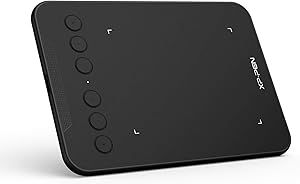
Deco Mini 4
₹3,500 approx.- Active Area4 × 2.5 in
- Pressure8192 levels
- StylusBattery-free
- Express Keys4 keys
- ConnectivityMicro USB
Best for: Students looking for a compact tablet with shortcut keys at a low price point. Slightly larger active area than the H420X.
Check Price on Amazon →Both tablets are a good starting point if you're testing the waters. At this budget, don't overthink it — any drawing experience is better than none. If you end up sticking with digital art, consider this a stepping stone and upgrade in 6–12 months.
This is where the real sweet spot is for beginner-to-intermediate artists in India. The tablets in this range offer a noticeably better drawing experience — larger active areas, more refined pens, and better build quality. If you're serious about learning digital art, start here.

Inspiroy H640P
₹5,500–6,990 approx.- Active Area6.3 × 3.9 in
- Pressure8192 levels
- StylusBattery-free
- Express Keys6 keys
- Android SupportYes
Best for: Beginners who want the most specs for their money. Regularly goes on sale, making it one of the best value tablets in India.
Check Price on Amazon →
Deco 01 V2
₹5,900–7,500 approx.- Active Area10 × 6.25 in
- Pressure8192 levels
- StylusBattery-free
- Express Keys8 keys
- Android SupportYes
Best for: Artists who want more room to draw. The 10×6 inch active area is unusually large for this price point — great if you have desk space.
Check Price on Amazon →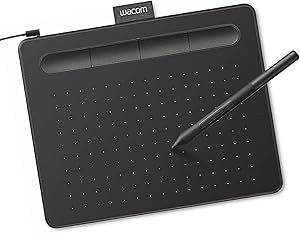
Intuos Small
₹7,399 approx.- Active Area6 × 3.7 in
- Pressure4096 levels
- StylusBattery-free
- Express Keys4 keys
- Software BundleIncluded
Best for: Those who value brand reliability, driver stability, and the software bundle (includes Corel Painter Essentials + Clip Studio). Wacom's driver support is the gold standard.
Check Price on Amazon →This range is where most serious beginners should shop. The H640P offers the most for its price. The Deco 01 V2 wins on active area size. The Wacom Intuos Small is the most trusted name — if driver reliability and bundled software matter to you, it's worth the slight premium.
Common Mistakes Beginners Make When Buying
-
Buying a display tablet as their first purchase
Display tablets (like the Wacom Cintiq or Huion Kamvas) start at ₹20,000 and go much higher. They feel natural to draw on, but beginners spend most of their time learning fundamentals — not perfecting brush stroke feel. Save the upgrade for when you're consistently creating work.
-
Thinking bigger active area = better
A larger drawing surface sounds appealing but causes more wrist and arm movement. Many professional illustrators prefer A5 tablets because the smaller mapping means less physical effort per stroke. Don't stretch your budget for a bigger tablet unless you have a specific reason for it.
-
Not checking software compatibility
Most tablets work out of the box with Photoshop, Clip Studio Paint, Krita, and Procreate (iPad). However, some require driver installation that can occasionally conflict with older operating systems. Check the manufacturer's compatibility page before ordering — especially if you're on Windows 11 or an older Mac.
-
Ignoring India warranty & service support
Wacom, Huion, and XP-Pen all have India warranty coverage, but the service experience varies. Wacom has the most established service network in India. Huion and XP-Pen typically handle warranty claims through email and courier — which is fine, but take longer. Check the warranty terms on the Indian listing specifically, not the global page.
Which Brands Are Available in India?
Three brands dominate the drawing tablet market in India, all available on Amazon and Flipkart with India warranty.
- ◦ Japanese brand, industry standard
- ◦ Best driver stability & longevity
- ◦ Bundles paid software
- ◦ Slightly pricier for specs given
- ◦ Established India service centres
- ◦ Chinese brand, excellent value
- ◦ More specs per rupee than Wacom
- ◦ Regular discounts on Amazon India
- ◦ Driver improved significantly in 2023+
- ◦ Warranty via courier process
- ◦ Chinese brand, strong mid-range
- ◦ Largest active areas at low price
- ◦ Official India store at xp-pen.co.in
- ◦ Good Android compatibility
- ◦ Warranty via email + courier
Can You Use a Drawing Tablet for Other Things?
Yes — a drawing tablet is useful beyond just digital painting. Once you have one, you'll find yourself using it for:
Learn What to Actually Do With It
The tablet is just the tool. What matters more is knowing how to use it — the fundamentals, the software, the workflow. That's exactly what Artma's free workshop covers.
Join the Free Workshop → Free · Live · Beginner-friendly · No prior experience needed